When I was a kid in the mid-late 80s, one of the kids in our friendship circle didn't have a TV at home. I remember back then thinking it was different. We all had TVs and chat about Neighbours was staple conversation back then.
I also remember wondering if it was an intentional decision by his parents - after all they didn't wear shoes (that said, my other friend who's mum didn't wear shoes had two TVs in their house, so obviously my childhood measurements was total garbage!).
Was it because TV was rotting our brains. Was it to keep the kids reading and doing stuff outside. They were an extremely creative family.
I always expected him to lose his mind over the TV when he was at another house. He wasn't, at all. For me, TV was something you sat down to watch. If it was on, you watched, and if it wasn't on, you played. The thought of playing with TV on in the background was…incompatible.
The kid grew up and so far as I know, these many decades later, was perfectly adjusted - as much as you can be.
This memory bubbled to the surface after reading the latest on the push to ban social media for children (actually, this also includes AI chatbot - which I think might be even more important). For balance I also read this article suggesting grave consequences (there's some decent points made beyond the strap line).
At Chez Sharp, our house has already blocked out social media for quite some time now.
The Why
There's much more literate ways to say it, but in my head, the idea of exposing children to the full breadth of both the web and the internet (i.e. via closed mobile apps) is pretty dangerous. I wouldn't drop my kids in London at night (we don't live in London) and tell them to make their own way back.
I believe the web, for children, needs those guardrails bowling alleys have - to guide them in the general direction they should go and so they don't go falling into some god awful stink hole (let alone the random nasty shit there just to mess with them - the Peppa Pig thing from a few years back).
With that in mind, social media web sites are, I believe, places for adults (pfft, even then it's messing us up).
But then the addictive aspect is something that I worry about too. For example, YouTube shorts is part of YouTube that can't turn off. You can dismiss for a while, but it always comes back. Designed to keep you on the site.
There's some amazing content out there, and I absolutely understand the desire to get a quick fix of giggles from a short. I absolutely love hearing my kids giggling, but seeing them thumbing their way through shorts searching for their next hit is… well, it's weird to observe.
TikTok, YouTube Shorts, Instagram (and more) - they're all part of that instant hit generation of products.
Then Twitter, Facebook and pretty much every damn mobile app shoving in their own social network - hiding behind "community" whilst their protection tools are missing or withdrawn.
Sadly our eldest became the "live experiment" for working out where we had made our mistakes. With the youngest, when she was given a smart phone, all access to the internet was blocked and individually opened as they needed.
The How
The short version is: controld. As this is my place of wordy words, here comes the long version.
The background was that I started with PiHole. It's a wonderful project, and from my experience fairly simple to get running, that's designed to protect you from trackers and ads by blocking the DNS request (or rather sending them into a sink hole).
This same "protection" method, I decided, could be used to be applied to YouTube (yes, a sledgehammer). Technically this sort of works, but it's a rather tricky regexp which I when I got right worked, but maintaining it was tricky.
This meant that all of a sudden our entire home network was protected from Facebook (and the like) trackers and aggressive ads. It meant that we all benefited on our devices, be it a mobile phone or desktop computer without having to adjust anything on the individual devices.
This was superb. It also meant I could lock rules to mac addresses of devices (which I did have to turn off the "randomised mac address" feature the phones had) - which meant that now YouTube (all of it) was blocked on the phones. YouTube could still be viewed on the TV (which I had heard, anecdotally, was potentially "better" than viewing from a mobile/small device - citation)
However, anyone tracking the variables will spot immediately that as soon as the children left the home network, all those protections would vanish as they roamed cellular data.
There are ways to get access to your PiHole remotely. If this was a one person project, personally I'd use Tailscale and PiHole together for a very low cost (hardware only) solution. But this needed to be very easy to apply to additional devices.
Quickly I found that there were two pay-for solutions - but I think, certainly for my needs, are well priced:
Feature-wise they're both very similar. I started by using NextDNS but moved across to ControlD primarily because I could see their product had recent (and continued) updates in their features and support.
I will admit there's a bit of a learning curve to both (and they use different grammar in the way they describe connected devices), but it's not super steep and once set, it's mostly forget.
Most of what I'll cover (if not all) is available in both products, but I'm using ControlD so I'll explain from that perspective.
ControlD gave me the following:
- A native MacOS app to automatically connect to the DNS proxy
- Windows uses a free app called Yoga DNS
- An Android app (for our phones and tablets dotted around the house)
- A daemon command program for my router
- My router also had native support for ControlD (but didn't quite give me the control I wanted)
- I also use Tailscale (for connecting to my devices) and this also let's me route my DNS resolution through ControlD
- A host that I can set in the Private DNS mobile network settings
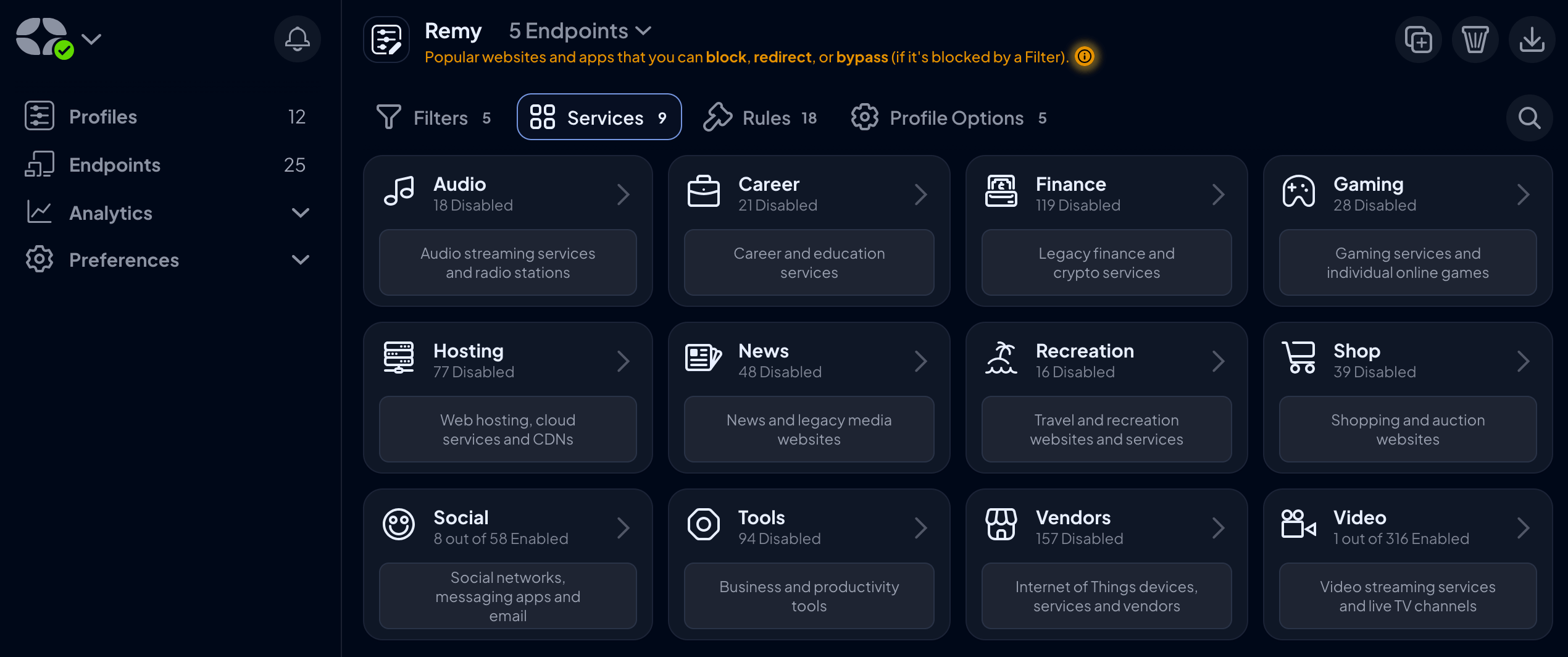
- Block & unblock on a lot of common services (like YouTube, TikTok, etc)
- An API that I can both check all devices are still connected but also flip blocks (like when the kids are given homework that requires them to watch YouTube(!))
- Finally there are 3rd party packs of filters that will block common trackers or ad networks
This is the dashboard which I can disable or enable social networks:
The Buy-in
This system then follows us around regardless of whether we're home or roaming. The kids, if they so chose, could technically unclip themselves from the protection. It's not straightforward but it's not impossible.
Which means, ultimately that we need buy-in from the kids too. We've explained our perspective on social media, on how it's a lens through which the world really doesn't exist, and the risks of closed chat systems in apps.
I think, for now, they understand that they're still children and we're responsible for their well-being, digital or otherwise.
curl -s -H "authorization: Bearer $API_KEY" -H "accept: application/json" https://api.controld.com/devices\?last_activity\=1 | \
  jq '.body |= (.devices |= map({name, last_activity})) | .body'

{
  "devices": [
    {
      "name": "remys-mobile",
      "last_activity": 1772528008
    },
    {
      "name": "tv",
      "last_activity": 1766270494
    },
    {
      "name": "kid-phone-1",
      "last_activity": 1765749600
    }
  ]
}