Rich text input is difficult on any platform, but I discovered a rather cheeky, but simple trick to give you rich text inputs on iOS.
READER DISCOUNTSave $50 on terminal.training
I've published 38 videos for new developers, designers, UX, UI, product owners and anyone who needs to conquer the command line today.
$49 - only from this link
The way a number of rich text input libraries work (like CodeMirror and Ace), is that when you're typing, you're typing in to a tiny, almost hidden, textarea. This value is then echoed and rendered using styled spans and the like creating a rich mirror of your input. Of course the editors are much more complicated than that - but our iOS technique follows this idea really closely.
Basically, in iOS if you set an input or textarea to have an opacity of zero, you can't see it (obviously!). However when you focus the element, the cursor is fully visible.
Also, selection still work, though it only shows the selection colour and block, not the text.
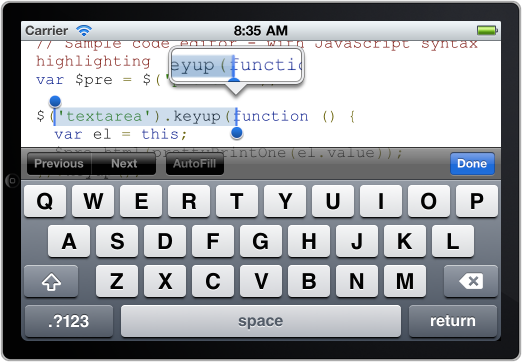
So what we do is sit a textarea on top of a div, listen for keyup, and take the value in the textarea, run it through a parser to get something syntax highlighting and place the rendered HTML under the textarea. This gives the illusion that we have a rich text input element.
You could use this trick to allow the user to select and highlight certain parts of a document - just like you can in the mobile version of google docs in edit mode.
Here's a demo that you can try out on an iOS device, which when you type will syntax highlight the code: example rich text input for iOS
Finally, if you want to learn more about mobile development, my conference Full Frontal, is running a full 2 day masterclass with the lord of mobile: PPK, so check it out (including ticket to the conference & exclusive dinner with the workshop teachers).